Guide · 3 stepsGuide · 3 stepsGuide · 3 steps
Connect your watch or step app to Apple Health or Health Connect
Which phone do you use?
We'll show the steps for it. You can switch any time.
Steps for your iPhone Steps for your Android phone Which phone do you use?
Set by your Steps Club app Set by the link you opened Detected your iPhone Detected your Android phone Remembered from your last visit Saved for your next visit Showing iPhone · Showing Android ·
- iPhone
- Android 14+
- Android 9–13
- Apple Watch
- Galaxy Watch
- Fitbit / Pixel Watch
- Garmin
- Oura
- WHOOP
Quick answer
Start in your watch's app, not in Apple Health or Health Connect. Open its settings, find Apple Health or Health Connect, and allow Steps. Sharing sleep or heart rate doesn't share steps.
Your watch's app › Settings › Apple Health or Health Connect › Steps
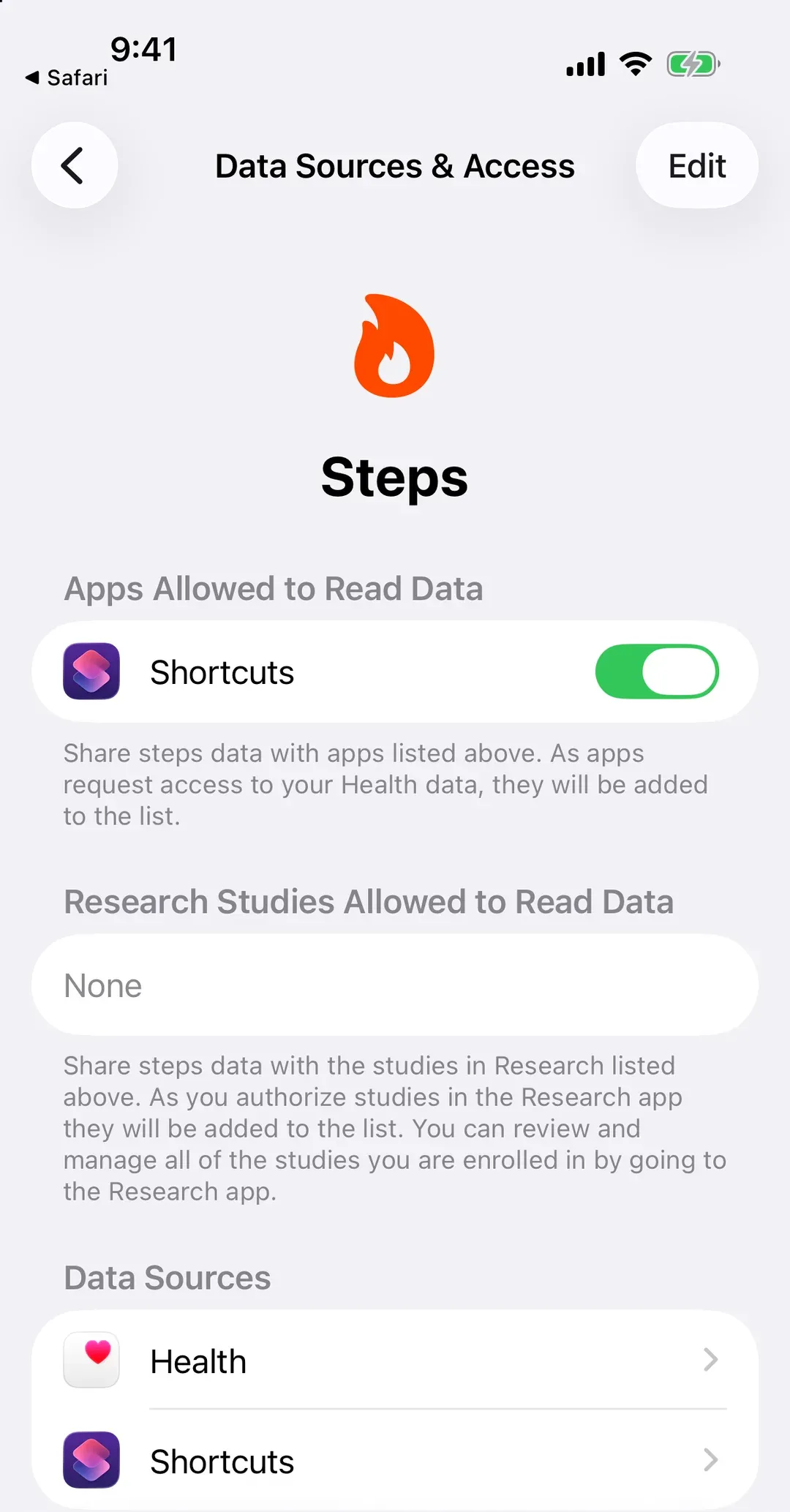
On iPhone
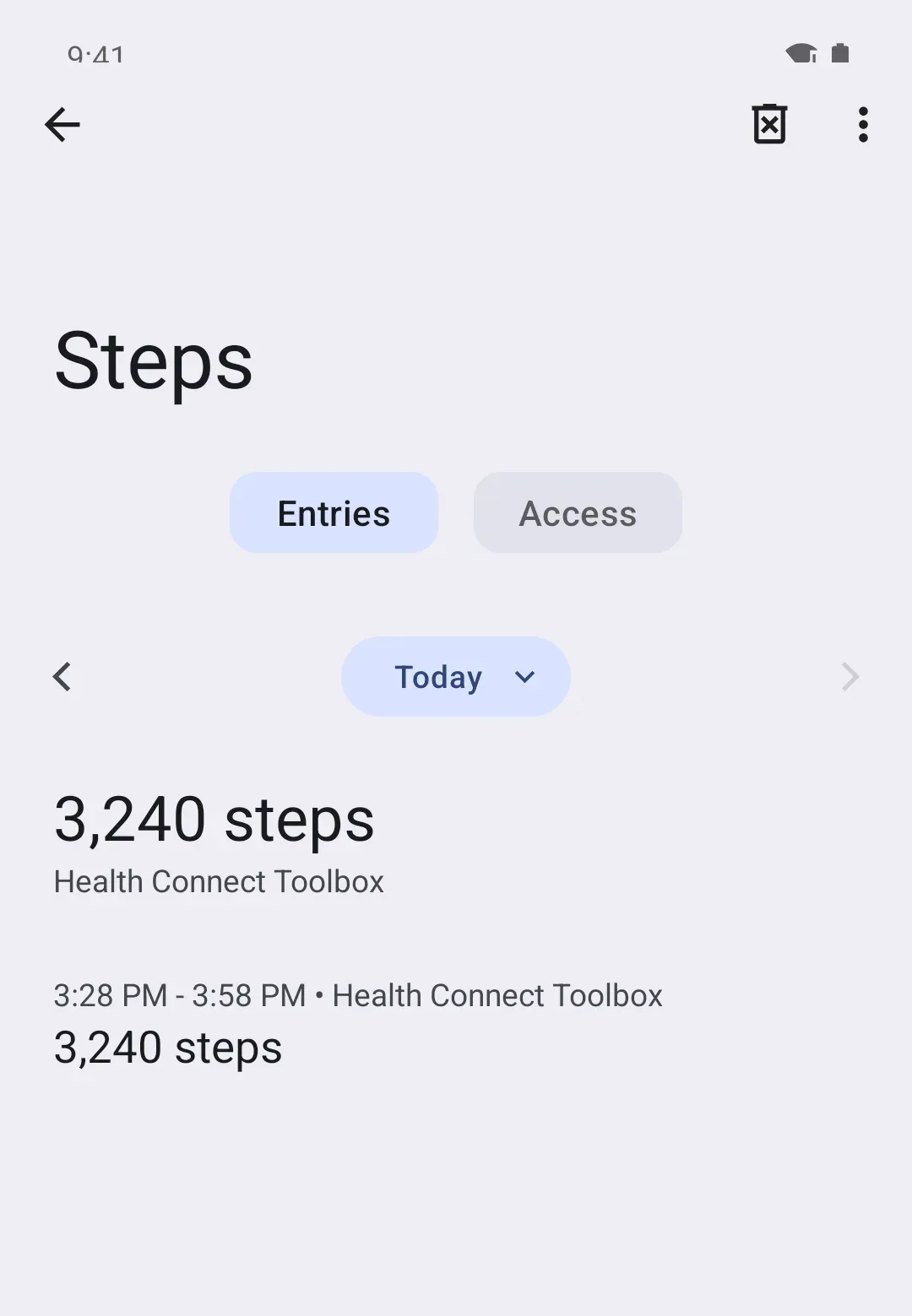
On Android
How your steps get there
Your watch, ring or band counts your steps and passes them to its own app on your phone. That app saves them into Apple Health (iPhone) or Health Connect (Android). Every other app that shows your steps, Steps Club included, reads them from there.
So there are three links: watch → its app → Apple Health or Health Connect. The middle one is where it usually breaks. The app is installed, it shows your steps, and sharing was never turned on.
Your phone’s own steps need none of this. An iPhone counts steps into Apple Health on its own. On Android 14 and up, Health Connect counts with your phone too, and on any Android version Steps Club counts with your phone once you allow Physical activity.
Pick your watch or app
| Your watch or app | iPhone | Android | Guide |
|---|---|---|---|
| Apple Watch | Sends on its own | — | Apple Watch |
| Samsung Health (Galaxy Watch) | Not with Watch4 or later | Turn on in Samsung Health | Samsung Health |
| Google Health (Fitbit, Pixel Watch) | Turn on in Google Health | Turn on in Google Health | Fitbit and Pixel Watch |
| Garmin Connect | Turn on in Garmin Connect | Turn on in Garmin Connect | Garmin |
| Oura | Turn on in Oura | Turn on in Oura | Oura |
| WHOOP | Turn on in WHOOP | Turn on in WHOOP | WHOOP |
| Google Fit | — | Still works, being replaced | Google Fit |
| Anything else | Look for Apple Health | Look for Health Connect | Something else |
Each guide covers setup, a quick check, when that app sends its steps, and the quirks people run into.
Your watch or app isn’t listed
Any watch or band works if its app can share steps with Apple Health or Health Connect. The setting has a different name in every app, but it’s always in the app’s own settings.
Android 13 and older: Health Connect is its own app there. Install it from the Play Store first.
- Open your watch or band's app and go to its settings.
- Look for Apple Health under Connected apps, Partners or Integrations.
- Allow Steps. Then open the app once so it sends today's steps.
- Open your watch or band's app and go to its settings.
- Look for Health Connect under Connected apps, Partners or Integrations.
- Allow Steps. Then open the app once so it sends today's steps.
Can’t find it? On iPhone, open Health, tap your profile picture, then Apps (under Privacy). Tap your app and turn on Steps. On Android, open Health Connect, tap App permissions (on Samsung phones, Your health apps), then your app, and allow Steps. Some apps only show up after you start the connection from inside the app.
No Apple Health or Health Connect setting at all? Then that app keeps its steps to itself, and no other app can see them. Your phone’s own count still works.
Google Fit
Google Fit can still pass steps to Health Connect. In Google Fit, tap Profile, then Settings, and under Health Connect turn on Sync Fit with Health Connect.
But Google is moving Google Fit users to the Google Health app and ending the Google Fit connections other apps use. For steps that keep arriving, switch to one of these:
- Your phone alone: on Android 14 and up, Health Connect counts steps with your phone. Nothing to install. Steps Club also counts with your phone on any Android version once you allow Physical activity.
- A watch: connect its own app to Health Connect directly, from the table above.
Put your watch first
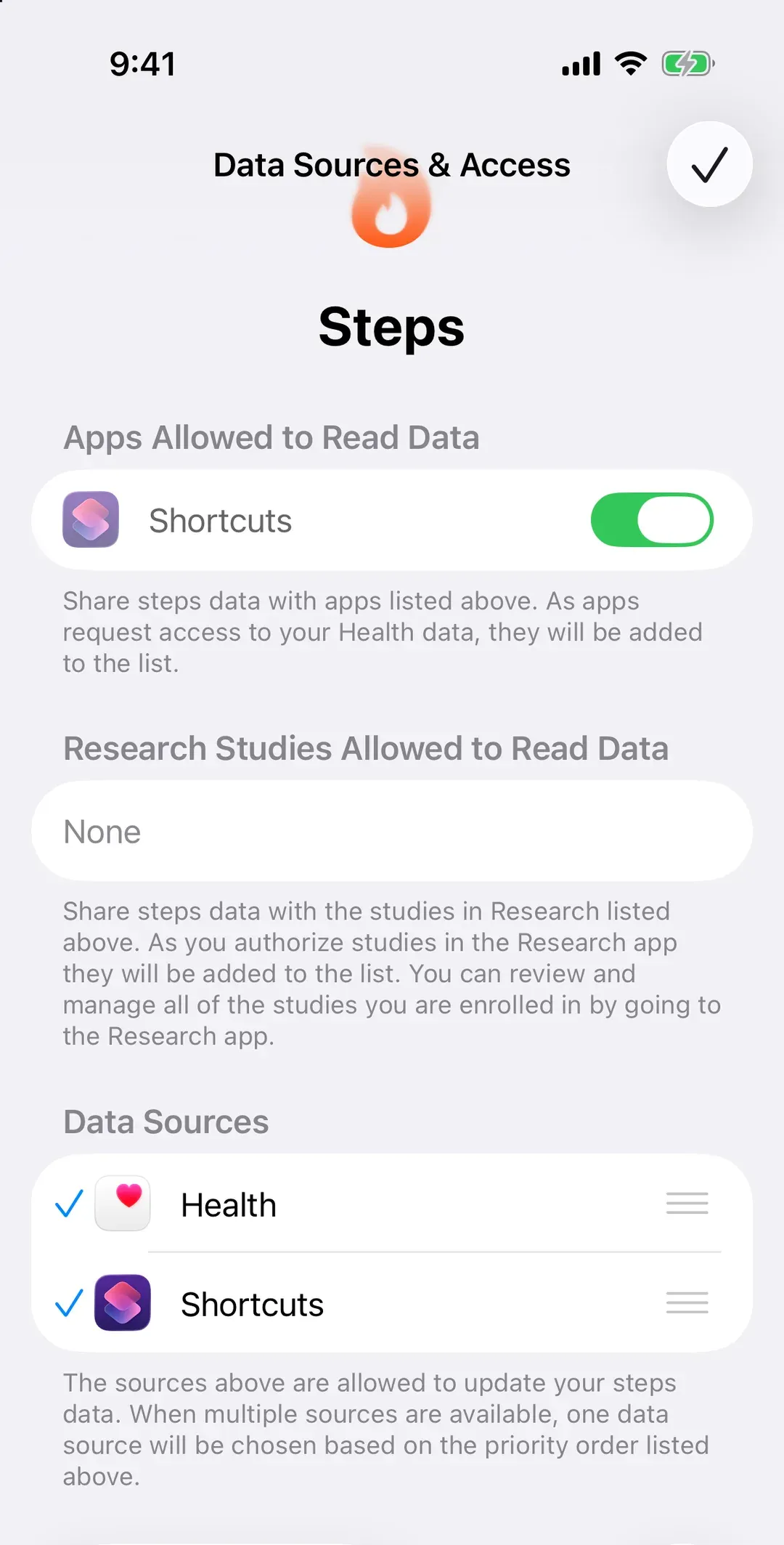
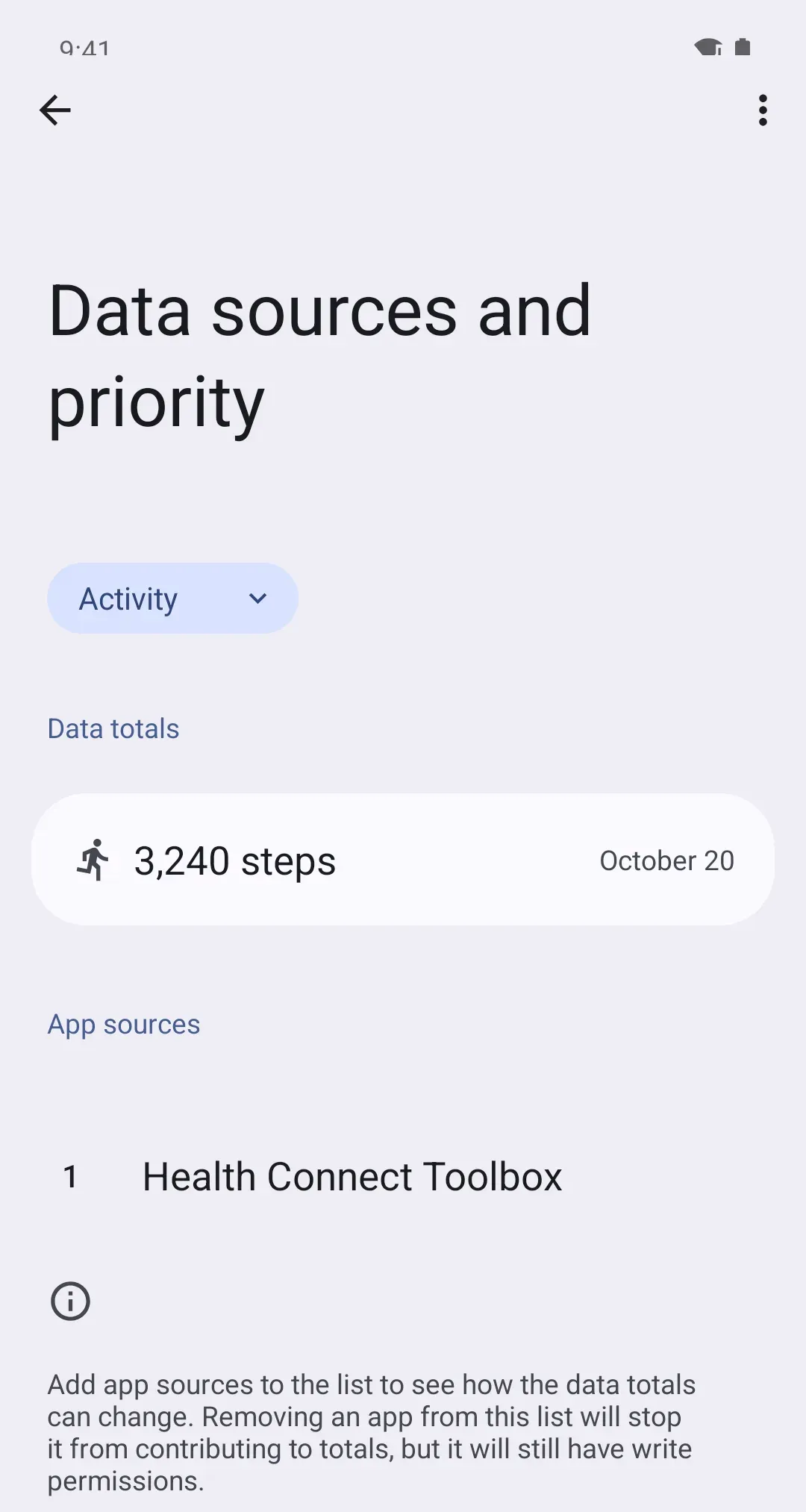
When your phone and your watch count the same walk, Apple Health and Health Connect don’t add them. They keep the count from whichever source is higher on your list. So once your watch’s app is sending, put it at the top.
- iPhone: Health › Search › Activity › Steps › Data Sources & Access › Edit, then drag your watch or its app to the top. A new app usually lands at the top on its own.
- Android: Health Connect › Manage data › Data sources and priority, choose Activity, then tap the three dots (⋮) next to your watch’s app and Move up until it’s at the top. Android 13 and older: don’t see Manage data? Tap Data and access, then Activity, then App priority.
The full walk-through: How Apple Health and Health Connect decide your step count.
On iPhone
On Android
Why it works this way
Watch makers keep your data in their own app first. Apple Health and Health Connect are the shared place on your phone, and each app has to be allowed in, by you, one data type at a time. That’s why turning on “Steps” matters: an app can share sleep or heart rate and still not share steps.
Most apps also send in bursts, to save battery. Some send when your watch syncs, some only when you open the app, and WHOOP often not until the next day. Each guide says when its app sends.